 |
| "An Idea" Yes! I did this Illustration as well |
Tuesday, 21 February 2012
Light bulb!

Wednesday, 25 January 2012
GSVI v2.0 real-time
After having finished the prototype guidance system earlier, an idea struck into my mind to make it real-time. Since everything was implemented in matlab (for the prototype) and because matlab is not good for real-time systems, I had to implement everything again (well sort of) in C++. I love working with OpenCV so there I began, doing all the stuff again in C++ using OpenCV library.
After much work, and tunning it with different algo's, i finally had it up and running. However, now came the main problem of testing this system in a real envoirnment, and since I have implmented everything on my desktop, it was impossible to take the desktop in a real path. So I took my camera and shot a small clip simulating a blind person walking, and deviading in both left and right directions slightly and then coming back to straight path.
I opened up this video using OpenCV and simply ran my code, the output was really impressive. This was the first time my system was working in a real world scenario, without controlled conditions.
Here is the output from the actual code:
Here is the output from the actual code:
Monday, 28 November 2011
Speaker-o-phone anyone?!?
One of these days I wanted to have voice chat with a friend of mine, but unfortunately his microphone was not working. He still had his headphones working though.
So I searched and found a very cool way to fix this.
Apparently microphones and speakers work the same way, however the difference being in the direction of data. Microphone is used to get voice data, whereas speakers are used to output the audio signals.

What I found was extremely simple and straightforward. All you have to do is plug the headphones jack in place of the microphone slot. Hoping that you have desktop speaker to hear other persons voice, you will be able to communicate with your friend using the very same headphones, just have to speak up into those small speakers.
I know what you guys are thinking now. No! its not one of those pranks, it really works. Simple physics!!
So I searched and found a very cool way to fix this.
Apparently microphones and speakers work the same way, however the difference being in the direction of data. Microphone is used to get voice data, whereas speakers are used to output the audio signals.
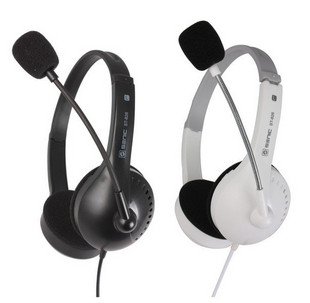
What I found was extremely simple and straightforward. All you have to do is plug the headphones jack in place of the microphone slot. Hoping that you have desktop speaker to hear other persons voice, you will be able to communicate with your friend using the very same headphones, just have to speak up into those small speakers.
I know what you guys are thinking now. No! its not one of those pranks, it really works. Simple physics!!
Monday, 12 September 2011
Linux Like Installation of OpenCV 2.3.0 on Windows
So you have been using Linux for opencv programming lately and now, for some reason, have no other option then to work on Windows. I too have to go through the same situation when I had nothing but Windows on my desktop and I was been too lazy to install Linux or maybe I wanted Windows for gaming.
Well this is your lucky day then, because I will be guiding you through 'Linux-Like-Installation' of OpenCV 2.3.0 on Windows. This guide will use minimum possible Linux System installation , hence it wont take much time to setup except for OpenCV compilation which takes sometime (and hey we all need sometime to relax)
First step is to download all the packages required for setup. Here are the direct links to the packages. You can also google these packages if, for some reason, you can not download them from here.
- Minimalist GNU for Windows: TDM-MinGW-4.5.2
- Cmake 2.8.4: cmake-2.8.4-win32-x86
- MSYS 1.0.10: MSYS-1.0.10
- OpenCV 2.3.0 Source: OpenCV 2.3.0
Tuesday, 16 August 2011
Windows?? nahhhhhh!
Ok, so I have been working alot on mac, for my new project. Today I came back to windows and it seems something is missing.
Hats off to developers of mac os, they have really put everything into its GUI, which windows still lacks a lot.
What I have been having problem with in windows was that if you want to scroll a page, you have to bring it to focus, unlike mac where its as easy as point and scroll.
So off I went googling, because I was hating microsoft people for not having this feature on their most recent version of windows. After a few clicks, I was able to have the same point and scroll on my windows too. Thanks to this small and very useful application named "WizMouse". It really helps when you are developing, and scrolling is all you need.
Download link: WizMouse
Hats off to developers of mac os, they have really put everything into its GUI, which windows still lacks a lot.
What I have been having problem with in windows was that if you want to scroll a page, you have to bring it to focus, unlike mac where its as easy as point and scroll.
So off I went googling, because I was hating microsoft people for not having this feature on their most recent version of windows. After a few clicks, I was able to have the same point and scroll on my windows too. Thanks to this small and very useful application named "WizMouse". It really helps when you are developing, and scrolling is all you need.
Download link: WizMouse
Subscribe to:
Posts (Atom)